
LinkedIn ID Decoder
This started with a simple question: when exactly did I write that? LinkedIn's own timestamps are vague at best and drift into "a while ago" fairly quickly, which is not particularly useful if you want to know the precise date of something you posted a while back. So I went digging, and it turns out the answer was sitting in the URL the whole time.
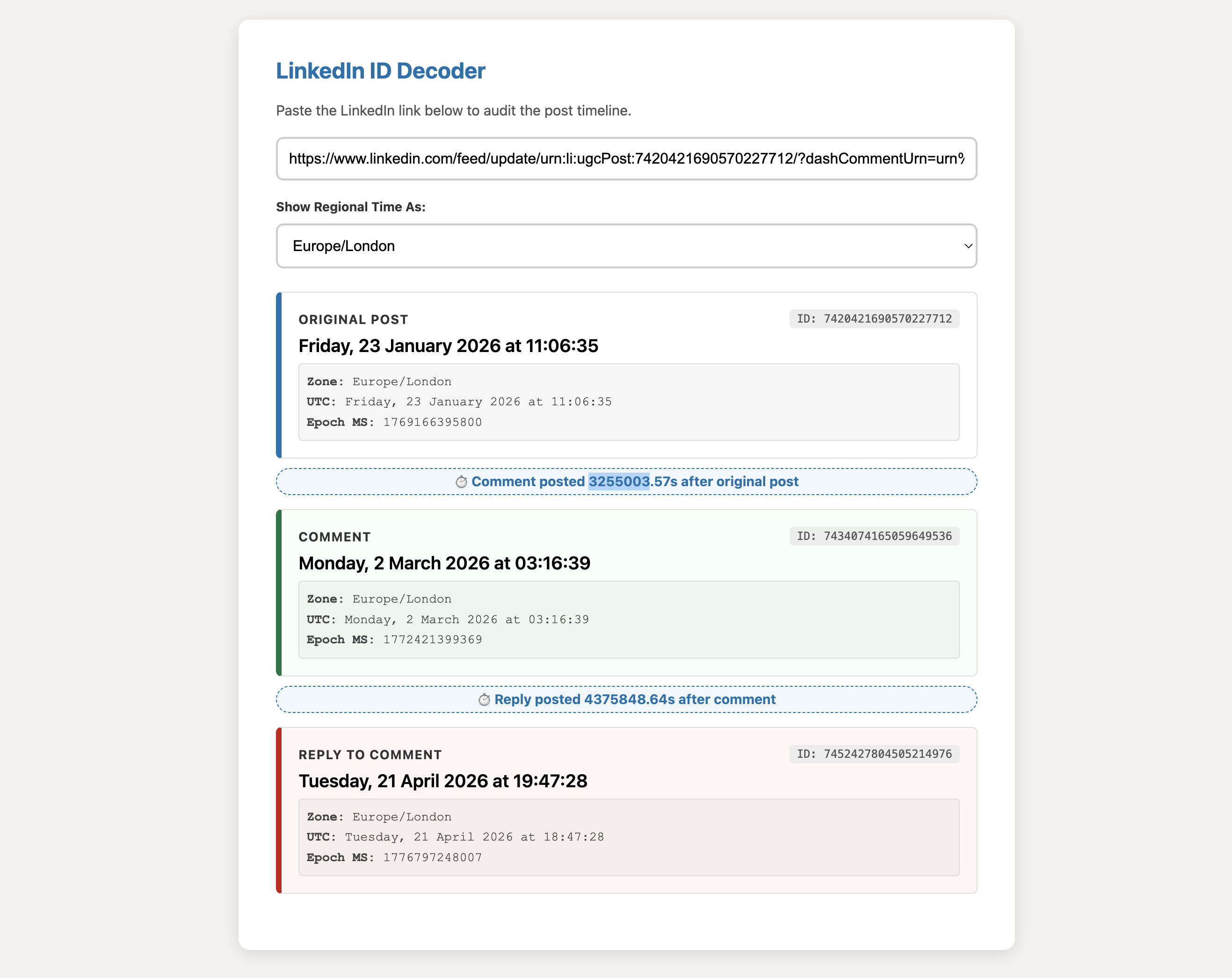
LinkedIn ID Decoder
A single-file browser tool that extracts exact timestamps from LinkedIn post, comment, and reply URLs.
How This Started
This started with a simple question: when exactly did I write that? I had a LinkedIn post from a while back and wanted to know the precise date. The timestamp LinkedIn displays is vague at best and disappears into "a while ago" territory fairly quickly. So I went digging.
It turns out that LinkedIn, like many large platforms, uses a Snowflake ID system. Every post, comment, and reply is assigned a 19-digit ID that has the creation timestamp baked directly into it. Once you know how to decode it, the exact date and time is sitting right there in the URL, down to the millisecond.
What It Does
Paste a LinkedIn URL and the tool will extract and display:
- The exact date and time the original post was created
- The exact date and time of a comment, if the URL points to one
- The exact date and time of a reply to a comment, if present
- The time gap between post and comment, or between comment and reply
All times are shown in your chosen timezone as well as UTC.
How the Decoding Works
LinkedIn Snowflake IDs are 64-bit integers. The first 42 bits encode the timestamp in milliseconds. To extract it, the tool performs a bitwise right shift of 22 positions, which strips away the internal machine and sequence bits and leaves the millisecond timestamp. That is then converted into a standard JavaScript Date object.
How to Use It
This is a single HTML file with no dependencies, no build step, and no server required.
Running It
Download linkedin-id-decoder.html and open it in any modern browser. That is it.
git clone https://github.com/rilhia/linkedin-id-decoder.git
cd linkedin-id-decoder
open linkedin-id-decoder.html
Or simply double-click the file.
Getting the Right URL
The URL you need is not always the one in your browser's address bar. To get the correct link:
For a post: Navigate to the post and copy the URL from the address bar. It should contain a 19-digit number.
For a comment: Click the three-dot menu on the comment and select Copy link to comment. This gives you a URL containing the comment ID.
For a reply to a comment: Click the three-dot menu on the reply itself and select Copy link to comment. This gives you a URL containing both the comment ID and the reply ID.
Using the Tool
- Open the tool in your browser
- Paste your LinkedIn URL into the input field
- Select your preferred timezone from the dropdown (defaults to your local timezone automatically)
- The results appear instantly
The tool handles both standard LinkedIn URL formats and the newer dashCommentUrn / dashReplyUrn format automatically.
What the Results Show
| Section | Colour | What It Means |
|---|---|---|
| Original Post | Blue | When the post was first published |
| Comment | Green | When the comment was posted |
| Reply to Comment | Red | When the reply was posted |
| Time Gap Indicator | Blue banner | Seconds elapsed between each event |
Each result also shows the raw epoch timestamp in milliseconds, which is useful if you want to do further calculations.
Supported URL Formats
The tool handles the following LinkedIn URL patterns:
/feed/update/urn:li:ugcPost:XXXXXXX/feed/update/urn:li:activity:XXXXXXX- URLs containing
commentUrnordashCommentUrnparameters - URLs containing
replyUrnordashReplyUrnparameters
Privacy
Everything runs entirely in your browser. No data is sent anywhere. No analytics. No tracking. The tool never sees your LinkedIn credentials or session.
Limitations
- The tool requires a URL that contains a Snowflake ID. Shortened or redirected URLs may not work until they resolve to a full LinkedIn URL.
- LinkedIn occasionally changes its URL structure. If a URL is not being decoded, check that it contains a 19-digit numeric ID.
Licence
MIT. Use it, modify it, share it freely.
Built by Richard Hall